Saturday, May 9, 2009

Winner of April Stamp Giveaway!!

It's time to announce the winner of the "Keys" stamp set. Drum roll.......the winner is

Debbie said...
Beautiful stamps Irene. Spring for me is the most beautiful time of the year. Living in the UK we have had months of dark, drab, cold days, with rain, frost, snow, fog and wind. I love spring.The fresh green leaves just bursting to see the light of day. The smell of the first cut on the lawn is luschious. The welcome bird song after months of silence. Children playing, their laughter brightens the day. I could go on...I love springtime.Hugs Debbie xx


Congrats Debbie!!! Please email me your address so that I could send the stamp set to you. Thanks to everyone that had played along.

Friday, May 8, 2009

Want to see my Scrap Space?

I remember quite a few of you had requested to see my scrap space for sometime now. The reason why I did not share any pictures of my old scrap space is because I don't own a proper scrap space then. It's just a small corner in our old home office.

Now, I do have a better scrap space in the new home. Yesterday, I've managed to steal sometime to snap a picture of it. Even though I'm sharing this room with my family, I do have my own table and work space. I'm able to organize my supplies better.

I'll be announcing the winner for the Blooming stamp set soon. Do keep an eye for it.

Wednesday, May 6, 2009

Cherish The Moment

This is a layout that I've created sometime ago using various different techniques.

Here are the steps to it.

1) Use a white card stock as the base for this page.

2) Cut out a huge square piece with a scallop edge from a pattern paper. Ink it's edges with distress ink. Add it to the middle of the page.

3) Cut out another strip from an other pattern paper and ink it's edges with distress ink. Add it to the left of the page.

4) Distress the edges of the photograph and ink it with distress ink. Add it to the page.

5) Cut out some frame overlay and add it to the upper right and lower left of the photograph.

6) Add a strip of lace on the bottom of the page.

7) Use the "Create Leaves Using Alcohol Ink Treated Transparency" to create the leaves and attach them to the page.

8) Use the "Add Little Beads on your Stitching" technique to stitch on the left of the page.

9) Layer a pattern paper behind a circle journaling overlay and add it to the lower right of the page.

10) To create the huge flower, simply use an acrylic flower and stamp on it using some acrylic paint. Later, highlight it's edges with paint markers and liquid pearls. Use the "Layer with Spiral Flower" technique on it.

11) Use the "Spiral Flower" technique to create the small flowers and add it to the page.

12) Stamp some butterflies using solvent ink on transparency and cut it out. Detail it with a white gel pen and Stickles.

13) I've used a rub-on for the title.

At this moment, I have a few more boxes left to unpack and I'll be all done. Can you imagine that I've not scrap for a month already. Hope I've not lost touch.

Sources: Clear Products: Clear Scraps; Card Stock: Bazzill; Pattern Papers: Basic Grey; Inks: Ranger Distress Ink, Ranger Alcohol Ink, Tsukineko Staz On; Stamps: Autumn Leaves, Impression Obsession; Others: Hambly Screen Prints overlay, Ranger Stickles, Ranger Liquid Pearls, Ranger Blending Solution, Inkssentials Opaque Pen, Making Memories Acrylic Paint, Zig Painty, beads, floss for stitching, buttons, lace, transparency, Glue Dots, Helmar Glue and other adhesives.

Monday, May 4, 2009

Dream Bookmark


I've had some fun with Tim Holtz's products in creating this project. I've used one of Clear Scraps huge acrylic bookmark.

Here are the steps to it.


1) Use a Clear Scraps acrylic bookmark for this project. Emboss the tip of the piece in the middle using an embossing machine.

2) Cut and paste the photograph from behind the bookmark.

3) Use some alcohol ink (cranberry, gold mixatives, butterscotch, espresso) to ink all over the bookmark except the areas where the photograph shows through.

4) Use the "Enhance your Embossed Image on Acrylic" technique on the embossed images. Add a little Stickles to dress it up.

5) Use a words stamp and some solvent ink to stamp on the upper right of the bookmark. Add some small rub-ons all over the bookmark.


6) To create the flower, cut the first and second layer of it from vellum. Use a white gel pen and some distress ink to highlight it's edges. Ink another medium paper flower with distress ink and layer on top of the first two layers. Add some Tim Holtz idea-ology gears in the middle of the flowers. For detailing, use liquid pearls and Stickles.


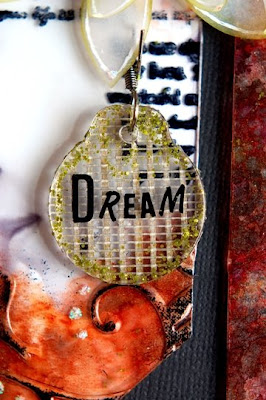
7) Use a Tim Holtz idea-ology fragment charm and cover the back of it with some Magic Mesh. Use the "Creating Moss Effect" technique on it and add a "dream" rub-on to it. Attach it to the flower with a Tim Holtz idea-ology swivel clasps.


8) Use a grungeboard dragonfly and ink it with distress ink. Cover it with some Magic Mesh, Distress Stickles (Antique Linen) and glossy accents. Use some Stickles to dress it up. Add it to the bookmark.

Hope this project would give you all a little idea on using Tim Holtz idea-ology products.

Sources: Clear Products: Clear Scraps; Inks: Ranger Distress Ink, Ranger Alcohol Ink, Tsukineko Staz On; Stamps: Queen Kat Designs; Rub-on: BoBunny; Others: Ranger Glossy Accents, Ranger Stickles and Distress Stickles, Ranger Liquid Pearls, Ranger Blending Solution, Tim Holtz’s idea-ology sprocket gears, swivel clasps, grungeboard and fragment charm, Inkssentials Opaque Pen, Prima flower, Magic Mesh, brad, vellum, Glue Dots, Helmar Glue and other adhesives.

Saturday, May 2, 2009

Enhance Your Embossed Image on Acrylic

I've actually used this technique in one of my old project and received an email requesting me to share it in more detail. This is a technique to enhance embossed image on acrylic piece.

It's a very simple technique. To colour an acrylic piece, normally I would use alcohol ink or paint markers. But to enhance embossed image on them, I would use solvent ink. Simply just rub your solvent ink pad (ie.Staz On) directly on the embossed image. If you want to have more colours on it, use a few paint markers (ie. Zig Painty) and doodle on them.

Try these techniques in your next acrylic project.

LinkWithin

Blog Widget by LinkWithin